Outlines of the Railway
nteract 2.6 polishes design with a left rail, outlines, packaging selection, and improved markdown + TeX rendering.
- design
- rail
- markdown
Highlights
- Navigate long notebooks from a left-rail outline
- Manage packages from the rail without turning dependencies into notebook cells
- Switch cells between code and markdown from the context and main menus
- Disable automatic code formatting when exact source layout matters
This release makes me very proud. I redesigned the cell chrome, created a markdown pipeline, and brought back everyone's favorite ToC. The focus in 2.5 was around outputs: navigable tracebacks, explorable DataFrames, and keeping secrets out of the outputs. In the 2.6 release we're turning back to document operations. Long notebooks get more structure with a dedicated table of contents/outline, tooling like package selection moves into a dedicated rail with room for more, and additional editing controls.
Find your place in long notebooks
Click the outline view in the rail to hop between markdown segments and image outputs within your notebooks.
The outline shows your heading hierarchy and updates live as you edit.
Packages belong beside the notebook
Can we all agree that this is not how we should install dependencies in a notebook?
! [ -e /content ] && pip install -Uqq fastbookNot everyone realized you could click Python/ to install deps into an nteract notebook. To make this more clear, packaging has been moved into the new rail. You can manage dependencies directly.
The big key with nteract though is to lean into your project's environment. Don't manage within the notebook itself, use the same dependencies you'll be using in production with your pyproject.toml, environment.yaml, or pixi.toml.
Hopefully now you'll be able to know the environment you have without needing a cell-shaped interruption in your notebook.
Markdown reads more like a document
Markdown got more serious in 2.6.
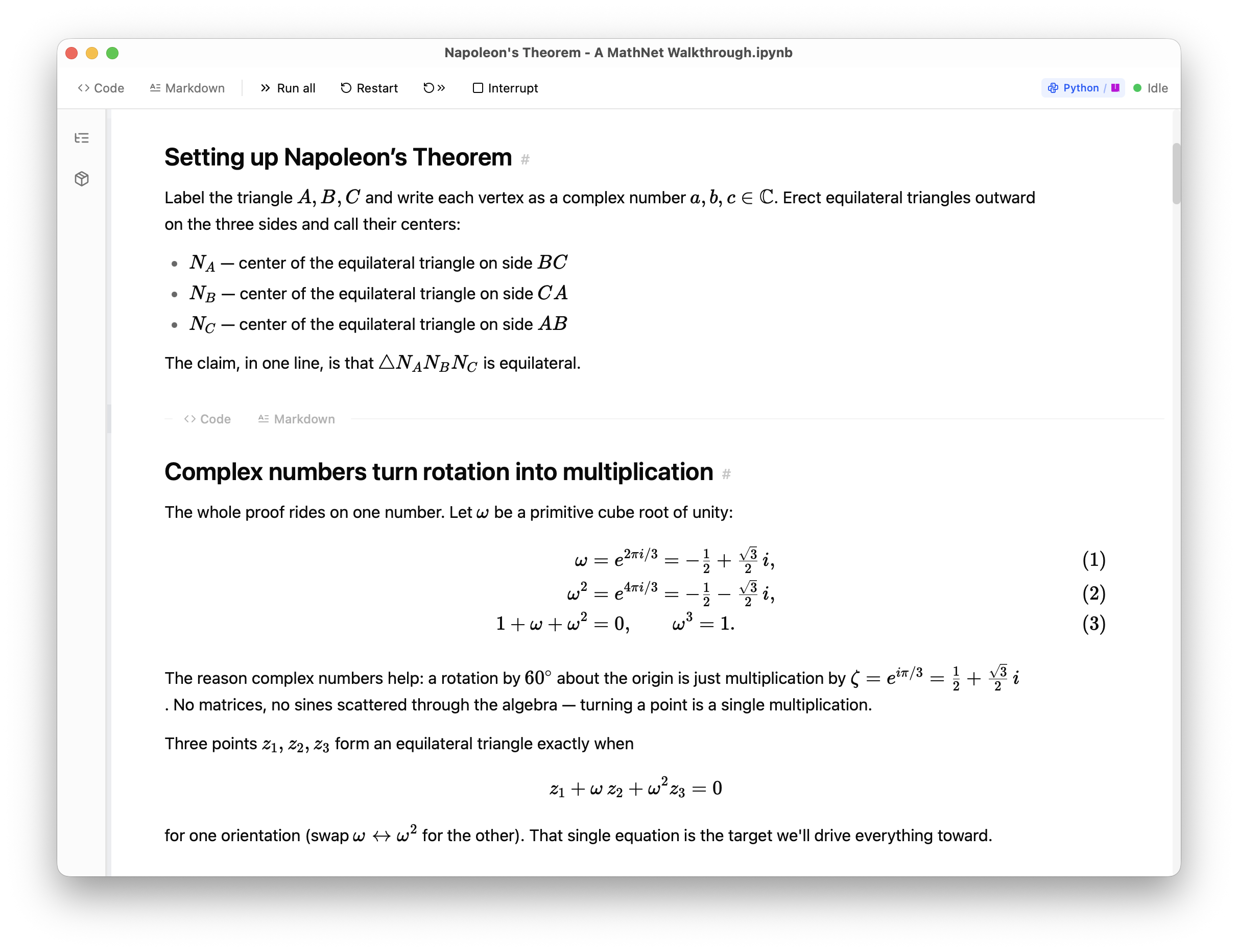
Bare TeX environments now project as math instead of plain text, completing compatibility with Jupyter notebooks. Write notebooks as they were intended, as a computational narrative that allows you to collaborate with others. Not just a pile of code cells.
As part of this release, there's a new Rust/WASM markdown engine. Users don't have to know about it, but it creates steadier parsing, better outline anchors, and very fast rendering. I'm hoping the document experience can go further from here.
Grand gestures of simplicity
After landing the rail work, it was clear there was opportunity to create clearer affordances for what you can do, what state a cell is in, and where the next action lives. Here's a tour of the small things we polished:
Hidden cells use clearer language
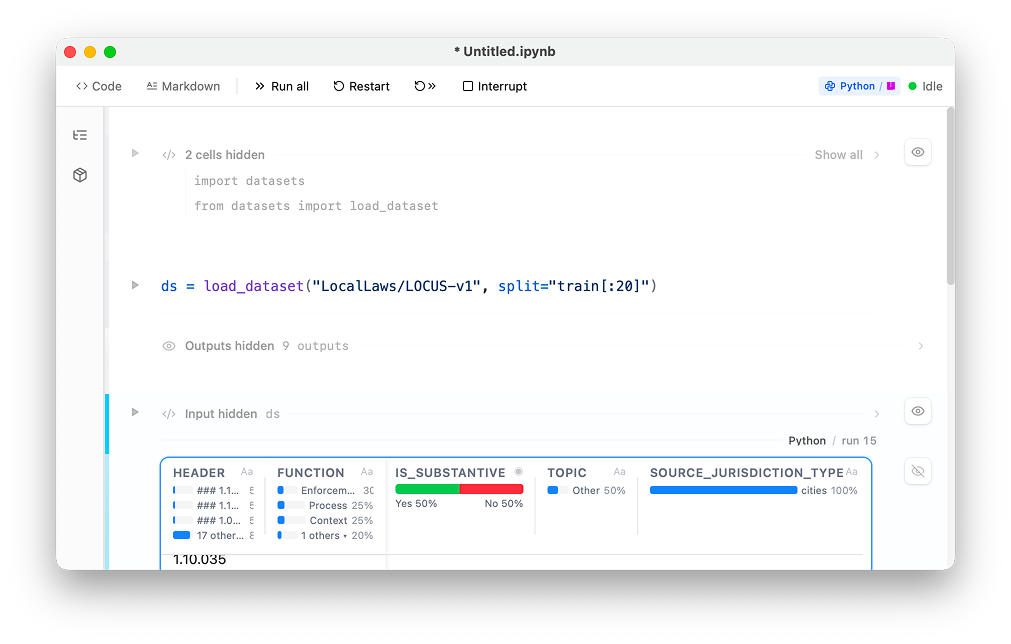
Motion on execution
Changing cell type
Right click a cell or use the menu to change its type in place.
Feature Flag Preview: Comments
This release has a still-in-development feature of commenting. If you want to try it out, turn on Enable Comments UI in Settings under Feature Flags. Select any code, rendered markdown, or outputs then leave a note. Leave replies in the discussion rail. This feature makes more sense when collaborating with users, which is why it's gated until hosted documents are available. However, you can start letting agents comment on your documents too.
What's next
Under the hood we've laid the foundations to extend the local realtime model to a real multiuser collaborative experience on the web, complete with attribution and identity backed by any OIDC provider.
More on this soon. Reach out on Twitter X, LinkedIn, or post a GitHub issue.
Technical changelog
Selected commits since 2.5.1
Highlights from the v2.5.1-stable.202605261941 → v2.6.0-stable.202606251403 range. Not exhaustive; see the release notes for the full list.
Rail, outline, and packages
- add contextual outline tree (db4b61a)
- add left rail panels (f07b528)
- add shared notebook rail shell (5b365b8)
- polish notebook rail outline and packages (c350f5c)
- split package manager panels (aaa65fd)
- share package summary surfaces (b41296c)
- document package manager surfaces (163f447)
Widget state
- save live widget state metadata (644933e)
- split widget comm state into
CommsDoc(13a5fe2) - project
CommsDocwidget state to Python (54339c1) - batch initial widget comm writes (e3054ec)
- hydrate widget progress views (f640db7)
- resolve widget comm blobs (d50887c)
- show stale widget snapshots (a9bbc54)
Markdown, TeX, and document structure
- project Markdown through Rust WASM (5d4682e)
- project bare TeX environments as math (70d1006)
- restore preview double-click editing (5d337e7)
- keep document frames selectable (449315f)
- use markdown engine anchors for notebook outline (9344e01)
- keep markdown outline live after edits (a0816b5)
- enable markdown spellcheck (b30db7b)
- refine document typography (e113ccb)
Notebook shell and ergonomics
- add capability-scoped document header (fdf13aa)
- drive
NotebookViewfrom shell capabilities (8af8135) - gate run controls on host-neutral runtime availability (4cb2b76)
- stage execution signal animation (fdac721)
- refine hidden and output surfaces (5b5fda8)
- soften hidden cell reveal rows (5477469)
- quiet completed cell status (335f0ab)
- keep hidden cell keyboard navigation moving (f2555da)
- preserve title editor caret order (e918a2e)
- preserve state across open and save-as (f62d91e)
Cell editing, settings, and formatting
- switch cell type between code and Markdown from the menus (191aa48)
- add a setting to opt out of automatic ruff / deno fmt (1f3d922)
- route synced settings through notebook host (e236938)
- ignore stale synced settings callbacks (a16db4e)
Outputs and runtime resilience
- render Bokeh notebook MIME bundles (a4b86f9)
- embed Bokeh renderer asset (43b4fc4)
- keep Bokeh renders stable across payload refreshes (4fbdbd6)
- render Panel notebook bundles (5171ccb)
- copy image from a context menu on raster outputs (b34b7fe)
- keep copy image inside the user gesture (00e1ef7)
- survive a daemon restart during initial materialize (be922a8)
- bound pool warmup timeouts (08b4fe4)
Comments preview
- gate comments UI behind opt-in
enable_comments(a57b960) - character-granular rendered highlight and run-derived display quote (#3791)
- rendered highlights activate their thread; author identity color and contrast (#3792)
- lighter discussion rail and single-field composer (#3794)
- multiple comment highlights per run and compose selection preview (#3796)
- ambiguous re-anchor refuses to guess (#3797)
- comments accessibility batch (#3799)